

Appearance
Troubleshooting
CLI warnings start with EasyTrace:. They keep the test command's exit code unless you use --strict.
Get more detail
Run the command with --debug to see the created run and any attachments that were not found.
Sign-in and permissions
Not signed in
Not signed in — run easytrace login, or set EASYTRACE_TOKEN in CI.
- On your machine, run
easytrace login. - In CI, add
EASYTRACE_TOKENas a secret. - If you already signed in, compare the API URL from
easytrace whoami; logins are stored per API URL.
No project
No project — run easytrace init or pass --project.
Run easytrace init, add a project id to easytrace.config.json, or pass --project <id>.
My project is missing from init
- Update if your CLI is older than 0.5.1; older versions list only the first 10 projects.
- Or skip the picker:
easytrace init --project <id>. - Confirm the signed-in account belongs to the organization with
easytrace whoami.
Project not found
Project <id> not found means the id is wrong or the account cannot access its organization.
- Check the configured id or run
easytrace initagain. - Confirm the account with
easytrace whoami. - Ask an organization admin to invite the account, if needed.
Session, token or browser-code problems
| Message | What to do |
|---|---|
Your CLI session expired or was revoked | Run easytrace login again. Sessions expire after 90 inactive days and can be revoked from CLI sessions. |
Token rejected | Replace a wrong or revoked EASYTRACE_TOKEN in Project → Setup. |
easytrace login is for your machine | CI detected CI=true; use EASYTRACE_TOKEN instead. |
This code has expired or was already used | Codes expire after 10 minutes and are single-use. Run easytrace login again. |
Reports and configuration
A report was skipped because it is old
No report for suite "<name>" from this run — skipped.
easytrace run only uploads files changed after the test command started.
- It is expected when that suite did not run.
- Add
--forcetoturbo runwhen Turbo restores a cached task; cached output does not rewrite the report. See Monorepos. - Check that the runner writes the path declared in the config.
No report file matches
No report for suite "<name>" — skipped.
Check the reports path relative to easytrace.config.json, then confirm the test runner is configured to write that file.
The report format is rejected
| Message | Fix |
|---|---|
Can't tell the format of <file> | The file is empty or unsupported. Set format on the suite or use --format. |
<file> is not a <format> report | The configured format and the file disagree. Correct it or remove it to enable automatic detection. |
No test results in <file> | No empty run is created. Fix the setup or compilation errors printed after the report has errors: and run tests again. |
The config is invalid or protected
easytrace.config.json is invalid: …— fix the named JSON or required-field error.easytrace.config.json already exists—initwill not overwrite it non-interactively; pass--forceonly when replacement is intended.
Uploads and coverage
Quota, connectivity and timeout
| Message | What to do |
|---|---|
Monthly test result quota reached | Open Usage & plan to see the reset date or change plan. |
Could not reach the API (ECONNREFUSED) | Verify apiUrl / EASYTRACE_API_URL and network access. The CLI retries three times. |
Upload timed out | The 60-second EASYTRACE_FLUSH_TIMEOUT elapsed. Increase it or reduce attachments, for example with Playwright trace: 'on-first-retry'. |
Sharded coverage
Coverage is not accepted per shard. Merge it in a final CI job, then run:
bash
easytrace coverage coverage/coverage-final.json --suite unitLocal upload of the default branch
Uploading main from your machine — this run becomes the baseline … is informational. A local default-branch run becomes the baseline; use a feature branch or set EASYTRACE_BRANCH=local/<you> to avoid that.
Dashboard results
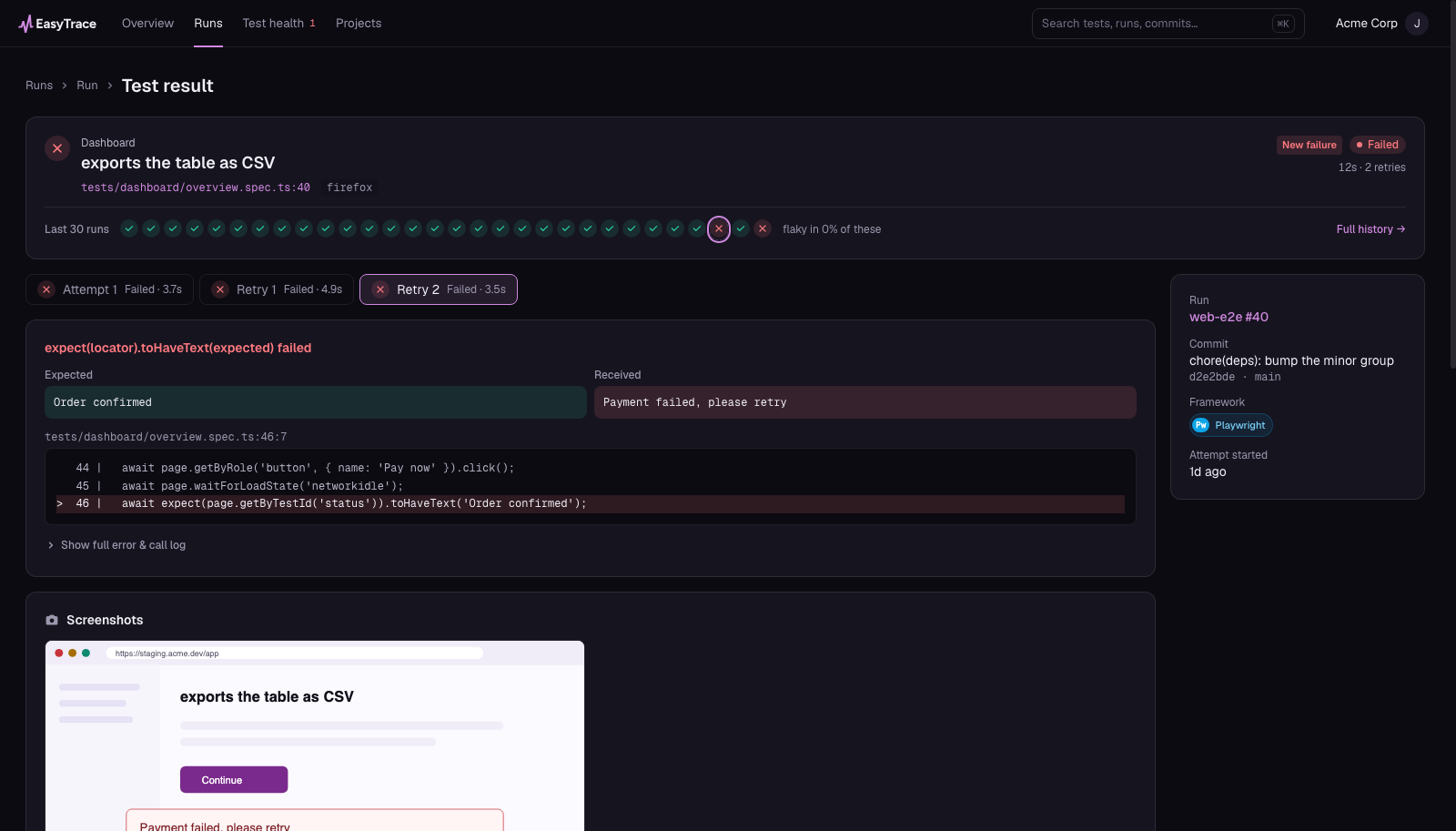
The run and test-result pages keep the error, retries, source location and captured artifacts together.
A run remains running
A shard likely stopped mid-upload. A run with no activity becomes interrupted after three hours.
Tests became new cases after a format change
A test identity includes its file, title path and browser. JSON and JUnit can name the same test differently, so changing formats can begin a new history.
A test never appears flaky
A result gets a flaky-change mark when its final pass/fail outcome differs from the previous completed result of the same test on the same branch. Check that both runs use the same file, title path and browser, which form the test identity. Skipped results and interrupted runs do not create a change. For the test to be flagged flaky in Test health or counted in Overview's Flaky tests rate, its highest per-branch change rate in the selected window must also meet the project's threshold (5% by default). Retries remain visible in a result's attempt history, but do not create a flaky change.
Vitest retries are missing from attempt history
Vitest JSON can include failureMessages from earlier failed attempts. The current EasyTrace parser uses retryReasons to reconstruct those attempts, so a passing retried test without retryReasons keeps its passed final result but does not show the earlier failed attempts. This does not change flaky-change detection, which compares final outcomes across runs.
Flaky counts include other branches
The Flaky and All tests views, and Overview's flaky rate, aggregate every branch. The Failing view uses the selected branch. A test is compared only with its previous completed result on the same branch, so a pass on main and a failure on a feature branch do not form a flaky change.
New failures and the baseline differ
- An Overview suite card compares the latest run with the previous finished run on the selected branch.
- A test's new failure mark compares with the latest earlier finished run of the same project and suite on the default branch, even if that run has no coverage.
- A coverage change compares with the latest earlier finished run of that project and suite on the default branch that has coverage. If the latest
mainrun has no coverage, new failures can use it while coverage uses an older run.
On a feature branch, a failure can therefore be new on the card but not be marked as a new failure.